
What is a screen-flow embedded product selector?
A screen-flow embedded product selector in Salesforce is an interface to select opportunity products and quote line items from within a Salesforce screen-flow interface.
Why is a screen-flow embedded product selector useful?
A screen-flow embedded product selector in Salesforce is useful because it allows sales reps to choose and price products as part of a streamlined process.
For example, a screen-flow may be used in a discovery call to gather qualifying information about a lead, and for qualified leads, the convert to an Account, Contact and Opportunity.
A screen-flow embedded product selector could then allow the sales rep to select and price products for the newly converted lead, all within the same screen-flow.
How to set up a Screen-Flow Embedded Product Selector
- Flexpricer’s Vision Product Selector interface can be launched within a screen-flow when the Screen Flow Awareness setting is enabled.
- To enable the feature, simply move the slider next to ‘Screen Flow Awareness’ on the Flexpricer Settings Page (Settings subtab)

How to use Vision Product Selector embedded in Screen-Flow
With the setting enabled, the Salesforce Administrator can embed Vision Product Selector as a component within a Salesforce Screen Flow as follows (note that these instructions assume underlying knowledge of configuring Screen Flows in Salesforce).
- Ensure that your Screen-Flow has a variable to store the Id of an opportunity that either already exists or that is created during the flow
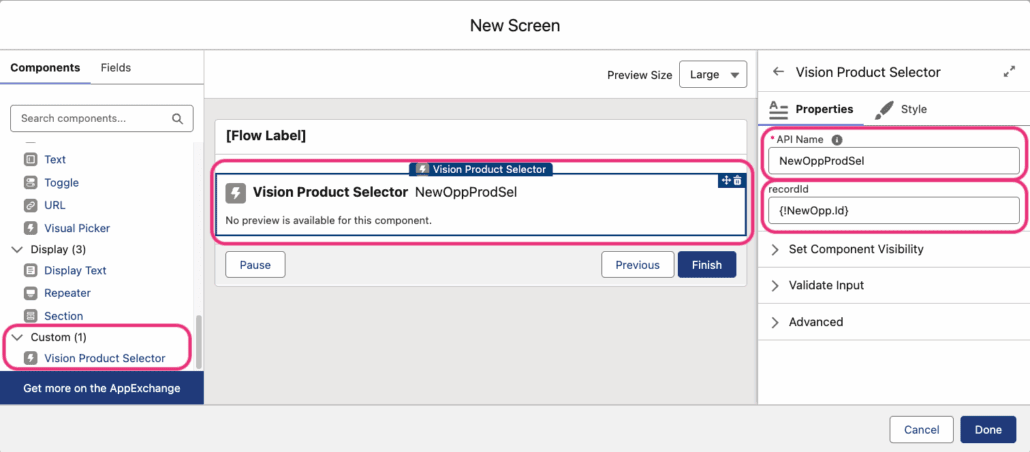
- Create a New Screen within your screen flow, setting a screen label and API Name
- In the components section, scroll to the Custom section
- Click on Vision Product Selector from the Custom section to add to your screen
- Click on Vision Product Selector that is now embedded on your screen and set its properties
- API Name: give the product selector a unique name within your flow
- recordId: set to the Id of the opportunity (from above)
- Press Done to return to your Screen Flow
Useful Administrator Information
- Based on current Salesforce Screen Flow capability, users are required to press the Save button in Vision Product Selector to save the line items before pressing the Next or Finish button in the screen flow.