
This feature is dependent on Salesforce’s Standard Approval Process functionality and is delivered as a separate extension package that can only be installed in Salesforce Enterprise Edition and above.
At the time of writing, Salesforce does not permit Approval Processes in Pro Suite and Professional Edition.
Flexpricer’s Advanced Line Item Approvals enable you to run Approval Processes from Opportunity and Quote Line Items through a separate custom object called ‘Approval Lines’.
How Advanced Line Item Approvals for Salesforce works
Being ‘Advanced’ Line Item Approvals, there’s a little more detail involved in the set up of this feature than most in Flexpricer.
We recommend careful consideration of using this feature if you are new to Salesforce.
Data Model
Below is the data model for Advanced Line Item Approvals functionality.
The key object in the data model is ‘Approval Line’. Records in this object are generated based on the Advanced Line Item Approval functionality and are ultimately submitted for approval.
The Approval Group, Consideration and Approver records are crucial to the creation of Approval Line records.
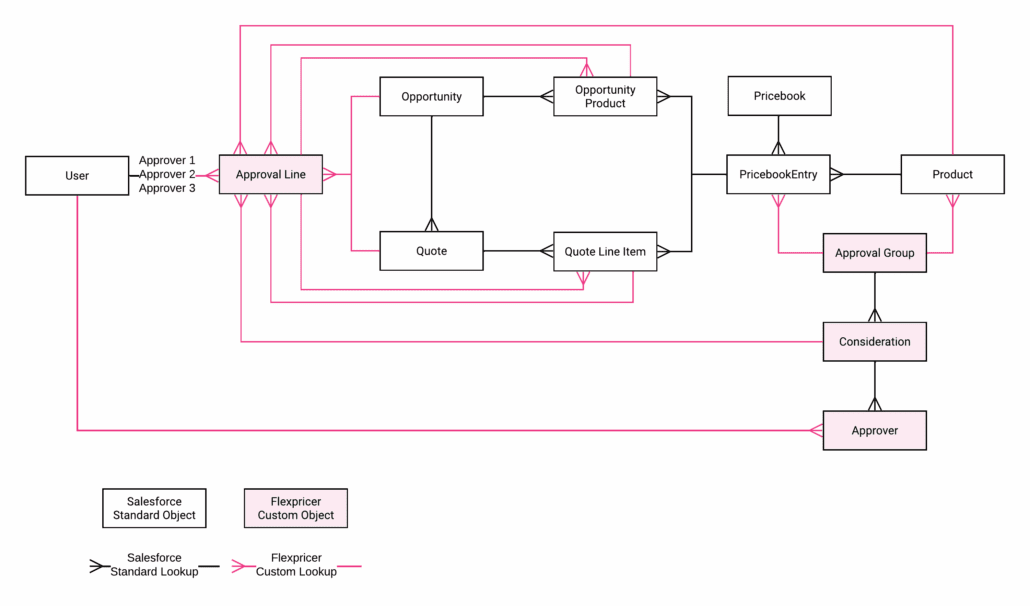
Understanding Approval Group Records
An Approval Group record associated with a Product or PricebookEntry declares the approval processes and approvers (users) that may be considered for a given Product.
- One Approval Group record can be associated with multiple Products and with multiple PricebookEntries via the ‘Approval Group’ lookup on Product and PricebookEntry objects.
- This data model means that you can allocate a separate Approval Group to each PricebookEntry of a given Product to allow you to route same Product through a different approval process (potentially with different approvers) based on the Pricebook that the Product is selected from.
Understanding Consideration Records
The Consideration object is a child of the Approval Group object and specifies the standard Salesforce Approval Process to run on the Products and PricebookEntries that are associated with the Approval Group.
- In Flexpricer terminology, we call the decision about which approval process to run and which users are approvers for that approval process a ‘Consideration’.
- There can be multiple Considerations per Approval Group.
- The Consideration object contains a picklist of Approval Processes. Only one Approval Process may be selected per Consideration record.
- The API names of the values in the Approval Process picklist on the Consideration record must match the API names of Standard Salesforce Approval Process.
- The object also contains a ‘Line Item Condition’ picklist, whose values are specified in the ‘Conditions’ picklist value set.
- ‘Approval Condition’ is a picklist on Opportunity Product and Quote Line Item, also populated with values from the ‘Conditions’ picklist value set.
- ‘Conditions’ usually contains the names of hierarchies that may apply in approvals (e.g. Management, CEO, Board).
You don’t have to use these hierarchies, you could create something like ‘UK Head of Sales’ or ‘US VP of Sales’ if you have a territory-based approach. - If the value in the ‘Approval Condition’ picklist on an Opportunity Product or Quote Line Item matches the value of the ‘Line Item Condition’ picklist on a Consideration record associated with the Approval Group that is associated with the line item’s Product or PricebookEntry, then the Approval Process specified on that Consideration record is used as the Approval Process of that line item.
Understanding Approver Records
The Approvers object is a child of the Consideration object. Approvers a are Salesforce Users and the Approver record specifies the users to be used in the Approval Process specified on the Consideration record.
- You can specify multiple Approvers for each Consideration record.
- So, for each Approval Group, you can have multiple Considerations (Approval Processes) and multiple Approvers (Users)
- This approach means you can use the same approval process with different approvers for different products.
- You must specify a Sort Order of the Approvers records associated with a Consideration, so that Flexpricer correctly populates the Approver lookups on the Approval Process.
—
All of this might sound fairly convoluted, but the approach is highly scalable.
A simple implementation approach of Advanced Line Item Approvals might be to use just a single Approval Group and apply that only to the Products that need approval.
That Approval Group might have just one Consideration record because there’s only one set of circumstances that approval needs to be considered.
And you might have just one Approver record associated with that Consideration because your approval process only needs one person to approve.
In this approach, you have just 3 records to create!
However, because it’s scalable, you could have tens or hundreds of different permutations of Approval Processes and Users based across a range of Products (or even more granular on PricebookEntries of those Products).
Different Approvers may approve different Approval Processes under different approval conditions.
Remember that behaviour in Flexpricer, and this extension, is driven by simple data records rather than coding, so creating a few records is all that’s needed to make this work.
—
Once you understand the data structures, you can move to the Approvals themselves!
How to Setup Advanced Line Item Approvals for Salesforce
Flexpricer must already be installed in the target org
Advanced Line Item Approvals is delivered as Managed Extension Package and is licensed on a per-user basis, just request the feature from our team together with the extension package installation line.
Remember that this Managed Extension Package has a dependency on standard Salesforce Approval Processes, so must be installed in an org that contains this feature.
- Request the Advanced Line Item Approvals Managed Extension Package and licenses from your Flexpricer sales contact and install into the same org as Flexpricer
- Update Opportunity and Quote page layouts by adding the Approval Lines Related List and the following fields
- Run Approval Processes on Approval Lines
- Total Approval Lines
- Approval Lines Not Approved
- Approval Lines In Approval
- Approval Lines Approved
- Initial Approval Comments
- Update Product page layouts by adding the Approval Group lookup field.
- Update Opportunity Product and Quote Line Item page layouts by adding the following fields
- Approval Condition
- Approval Line
- Approval Line Status
Using Advanced Line Item Approvals for Salesforce
How Approval Line Records are Generated
The Approval Line object is a child of Opportunity Product and Quote Line Item. Approval Line records are the Salesforce records that the Approvers will approve. They contain all the Flexpricer fields and standard pricing/discount fields from Opportunity Products and Quote Line Items.
- One Approval Line record is created per Opportunity Product or Quote Line Item when and only when the ‘Approval Condition’ picklist is set on Opportunity Product and Quote Line Item records.
- You specify your own criteria in Flows (or apex or other automation technology) to update the ‘Approval Condition’ picklist on Opportunity Product and Quote Line Item records.
For example, you may specify that if the Discount percentage on the Quote Line Item record is above the ‘Approval Discount’ percentage on the same record, that the ‘Management’ Approval Condition is met, but that if the Discount is above the ‘Floor Discount’ field specified on the same record, that the ‘CEO’ Approval Condition is met. - Once the ‘Approval Condition’ picklist is set, Flexpricer will navigate across the PricebookEntry to see if there’s an Approval Group associated with it.
- If it finds an Approval Group, it checks to see whether there is a Consideration record whose Line Item Condition matches the Approval Condition on the Opportunity Product / Quote Line Item.
- If there is a match, then Flexpricer creates an Approval Line record, specifying the value in the Approval Process field as the same as the Approval Process on the Consideration record.
- The Approver 1, Approver 2 and Approver 3 lookups to User on the Approval Line record are then populated with Users according to the Approver records associated with the Consideration.
Often we see this functionality utilise the dynamically populated Approval and Floor Prices/Discounts/Quantities that can be set using Flexpricer.
Approval & Floor fields are additional custom fields are provided in Flexpricer to help administrators create validation rules and flows with data from PricebookEntries, Contracted Pricing and Volume Pricing.
When a given PricebookEntry/Contracted Price/Volume Price record is used, the values in Approval Price, Approval Discount, Floor Price and Floor Discount are copied from that record to the line item. Validation rules and automations can be used to apply additional sales process controls.
For example, you could create a simple flow so that if a price is above Approval Price then specify the Management Approval Condition, if between Approval Price and Floor Price, specify the CEO Condition and if below the Floor Price, specify the Board Condition.
Each Product could have different approvers for Management, CEO and Board.
If the Approval Condition changes to blank on an Opportunity Product, then the associated Approval Line record is automatically deleted.
Opportunity and Quote Fields
- When the time is right in your opportunity process, just check the Run Approval Processes on Approval Lines checkbox on Opportunity or Quote objects and the related Approval Line records will be submitted for Approval based on the users and processes specified on the record.
- There are 4 informational number fields on Opportunity and Quote that can be used to drive business process behaviour (e.g. record types / layouts / workflows etc.)
- Total Approval Lines (the total number of Approval Line records)
- Approval Lines Not Approved (the number of Approval Line records that are not approved)
- Approval Lines In Approval (the number of Approval Line records that are in an approval process)
- Approval Lines Approved (the number of Approval Line records that are approved)
You may use the values in the informational number fields to drive record types of Opportunity/Quote based on your business process.
Advanced Administrator Information
Behaviour on Quote Sync
- The Approval Lines object is shared between Opportunities and Quotes. This means that when you sync a Quote with an Opportunity that the Approval Lines associated with the Quote and Quote Line Items automatically associate with the Opportunity and Opportunity Products.
- If you send Approval Lines associated with an unsync’d Quote through an Approval Process, the approvals are only associated with the Quote. You may subsequently choose the sync the quote, in which case the approved Approval Lines will associate with the Opportunity as well.
- If a sync’d Quote is unsync’d with the Opportunity, the Approval Lines will remain associated with both the Quote and the Opportunity until there are changes to either the Opportunity Products or the Quote Line Items. This means that simply unsyncing a quote does not force you to re-run your approval processes.
- It is important to be aware of standard Salesforce behaviour regarding quote sync: when you sync a Quote with an Opportunity, Salesforce removes all Opportunity Products and creates new line items based on the Quote Line Items.
Installation
- Advanced Line Item Approvals is a Managed Package that is licensed on a per-user basis. For every Flexpricer Enterprise or CPQ License, a license to use Advanced Line Item Approvals is available – just request it from our team.
- This package requires Salesforce Enterprise Edition or above
- 4 Custom Objects
- 69 Custom Fields (10 on Standard Objects)
Prerequisites
- Flexpricer must already be installed in the target org
Install Link (version 1.6)