Product Data Translations for Salesforce

If you find your international sales users are frustrated at working with Salesforce Products and would prefer to search and view product information in their local language, use Flexpricer’s Product Data Translations.

  • Create translations for your product data in any language, storing multiple translations per product
  • Select the language for product data to be displayed in on an Opportunity or Quote
  • Sales users search, view and add products with all the relevant information presented in their local language

With teams that span regions, territories, countries and languages, being able to interact with product data in native language whilst maintaining a single set of products makes life easier for them and the Salesforce Administrator.

No form to fill in or email address required.

Products with Local Language Translations (25-sec, no audio)

No form to fill in or email address required.
What are Product Data Translations for Salesforce and why are they useful?

In Sales Cloud, you select a Product using a basic interface to add it to a Quote or Opportunity and do not have the capability to translate information about a single product into another language.

But, international businesses may sell the same product in different regions using a different, local language name.  Same Product. Different Language.

Flexpricer extends Sales Cloud capability with Product Data Translations and allows you associate multiple language translations to each product and then specify the language that you wish to search on and use on your Opportunity or Quote.

No form to fill in or email address required.
Making Local Language Search Simpler

Using Product Data Translations, your sales users don’t need to learn another language to search for a product and add it to an opportunity. For example..

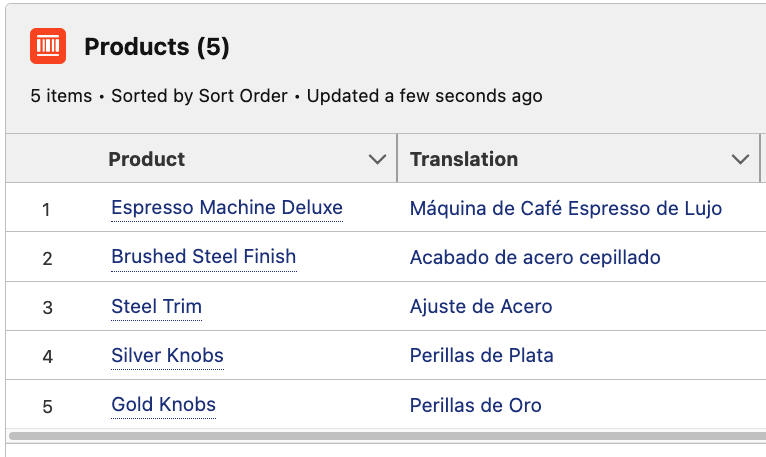
  • Your business operates in USA and Spain with teams selling a single product called ‘Espresso Machine Deluxe’
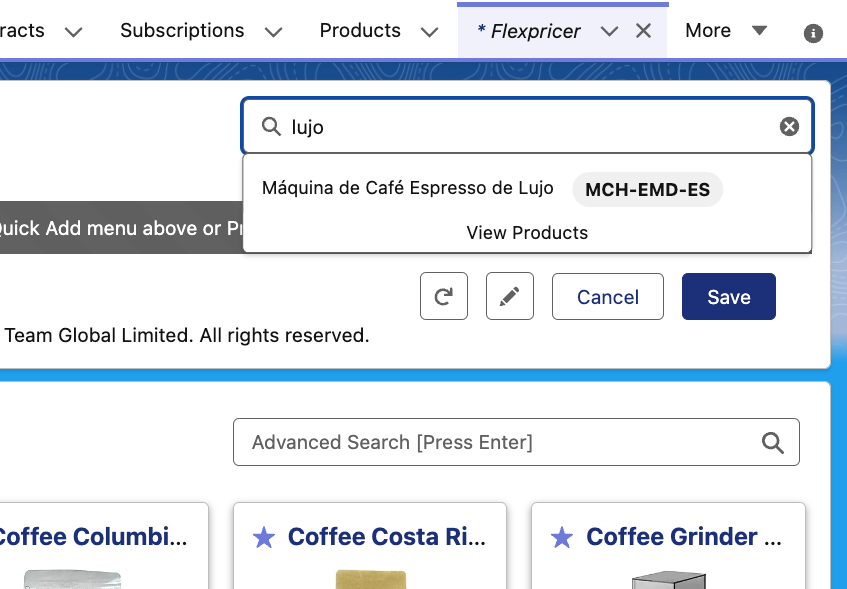
  • American Sales Users search for ‘deluxe’ and see ‘Espresso Machine Deluxe’
  • Spanish Sales Users search for ‘lujo’ and see ‘Máquina de Café Espresso de Lujo’

Behind the scenes, the American and Spanish user are interacting with the same product record.  Flexpricer creates a standard Opportunity or Quote Line Item for the same product.

Translating Product Configurations

Product Data Translations for Salesforce apply to standard and custom fields on Product.

Translate any text field on the Product record into a local language and have that translation made available on the line item.

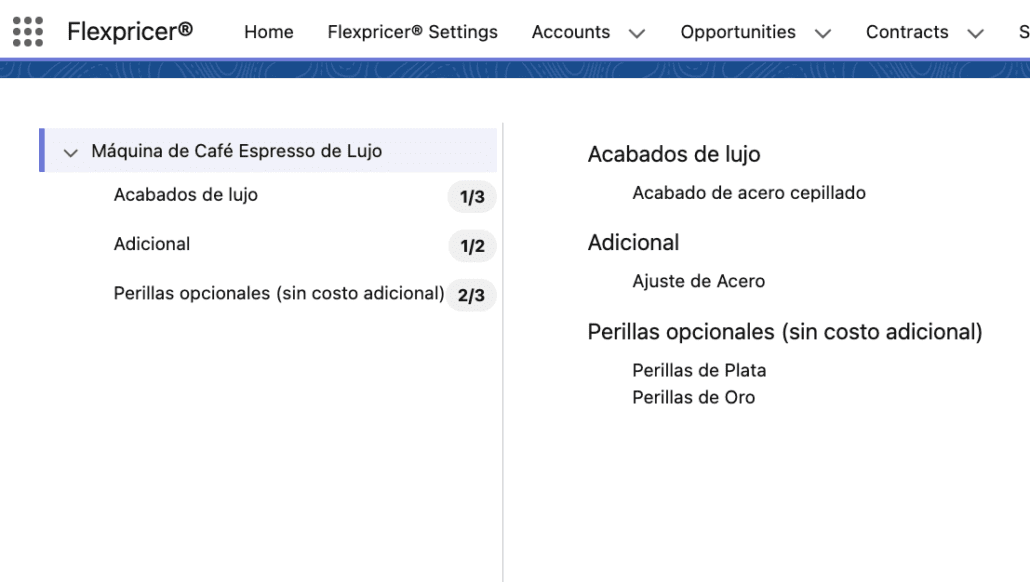
The feature even offers translations to groupings in the Product Configurator to make the localised experience for the user even better.

Interaction with Translation Workbench

Translation Workbench allows you to create translations for objects, field name and picklist values, but not text fields and will not save translations on a line item.

Flexpricer’s Product Data Translation offers unlimited language translations to text fields on Product records where the translated data can be searched and displayed in localised results.

The interface language used is set on the Opportunity or Quote record and is not dependent on the locale of the logged in user.

Product Data Translations are commonly used by companies with regional sales teams needing to select, price and sell from a single product database but using their local language

How are Diacritics Supported?

Flexpricer includes an option to toggle its search functionality to return results that include diacritics.

This means that you can search for words using the standard alphabet (without using a diacritic) and have results returned that include diacritics (e.g. search for ‘Franc’ and get both ‘Français’ and ‘France’ in the results).

Can Product Data Translations be used in DocGen?

Absolutely! The way that Flexpricer implements Product Data Translations means that translations into the specified language is always available directly via the opportunity line item or quote line item.

This means that with a simple tweak to your document generation setup, you can read product information from the associated Translation record.

How Long Does It Take To Implement?

Flexpricer is designed to be an easy app to implement – often in hours and days, rather than weeks and months like other solutions.

The relationship between Product and Translation is a straightforward and understandable by all Salesforce Administrators – even those with limited experience.

Simply enable the feature on Flexpricer’s Settings page, and create one or more Language Translation records for each product that you’d like to translate.

Learn More About Product Data Translations in Salesforce and Book a Call Today

Find out more about Flexpricer and Product Data Translations for Salesforce, talk through your use case with an expert in a FREE discovery call.