Contracted Pricing in Salesforce

When sales users waste time searching through spreadsheets for the correct price that an important customer should be paying for a product, but you need to streamline and bring this data into Salesforce, use Flexpricer’s Contracted Pricing.

  • Lock an Account-specific price for a Product without giving the Account a dedicated Pricebook
  • Ideal for customers with specially agreed prices for a manageable range of products
  • When a Contracted Product is added to an Opportunity for its associated Account, the line item’s Sales Price is automatically updated in real-time with the Contracted Price

Users no longer need to worry about prices that are specific to Accounts.  With Contracted Pricing it’s all there in Salesforce a displayed in real time.

No form to fill in or email address required.

Espresso Machine priced at 1,499 for Take-a-Break Account (16-sec, no audio)

No form to fill in or email address required.
What is Contracted Pricing in Salesforce and why is it useful?

In Sales Cloud, you select a Product using a basic interface to add it to a Quote or Opportunity.

There is no flexibility to automatically set the price to match a previous purchase, or if the customer negotiated a special, dedicated price for it.

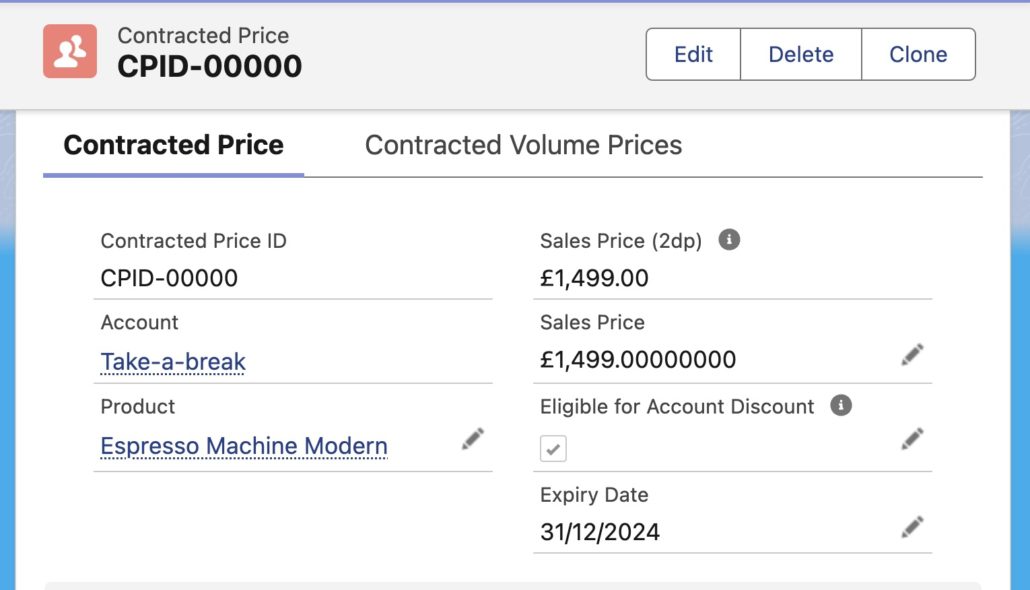
Flexpricer extends Sales Cloud with out-of-the-box Contracted Pricing CPQ functionality that allows you to create a relationship between an Account and a Product and specify the price to be used when the Product is selected for the Account.

You can even set expiry dates and discount controls, with information saved in easy-to-use data records that make reporting simple.

No form to fill in or email address required.
Contracted Price record in Salesforce

Create Accurate Quotes in Salesforce

Customers probably don’t expect to re-negotiate every time they place a repeat order.  But, using the standard product selector in Salesforce, it’s not easy to automatically apply a price that’s been previously agreed with an Account, the moment you add the line item.

Flexpricer’s Contracted Pricing offers…

  • A Salesforce custom object (“Contracted Prices”) that links a Product to an Account and stores information about the price to be used
  • Powerful Vision Product Selector interface that reads Contracted Price records in real-time, automatically adjusts the price as the line item is added and displays the Account-specific price
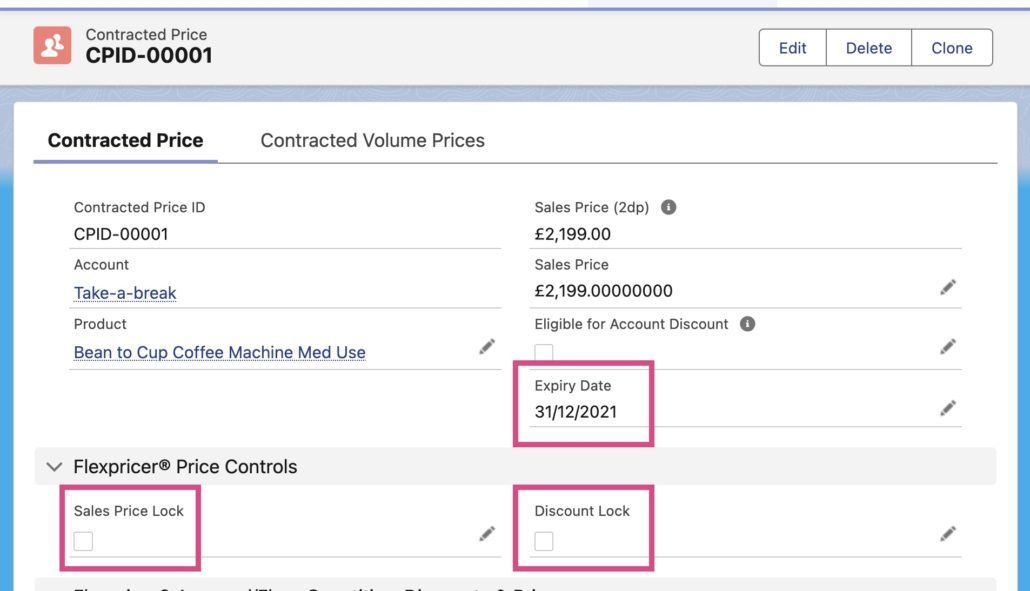
  • Optional expiry dates on the Contracted Price record can be used to prevent the same price being used in perpetuity

Enterprise Customers & Multi-site Businesses

If your business negotiates centralized prices with enterprise customers or multi-site businesses, then simplify access to prices for sites or subsidiaries with Contracted Price records on a Parent Account.

Flexpricer is Parent Account-aware and offers a simple solution to handle centrally negotiated prices…

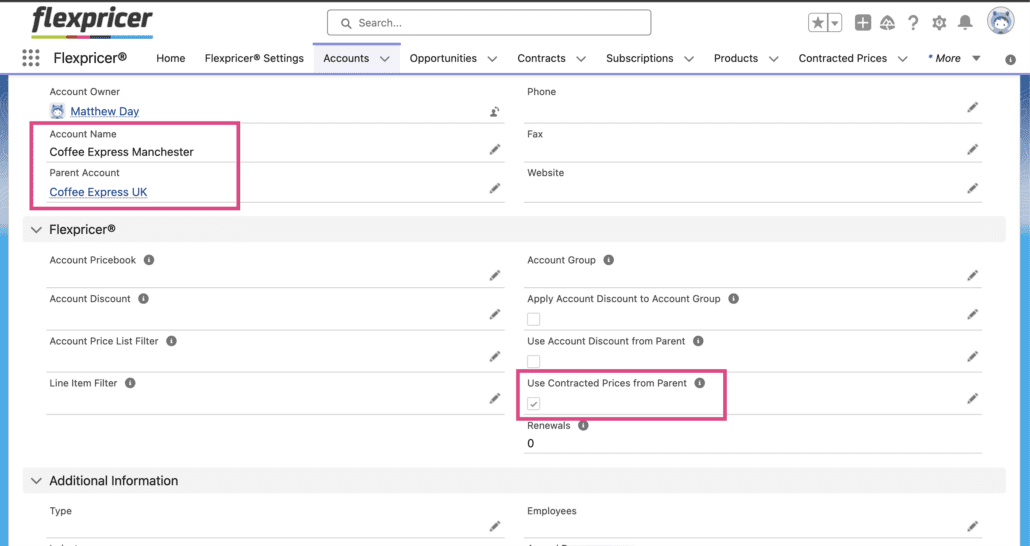
  • Create the Contracted Prices record on the Enterprise/Multi-site Account (the parent account)
  • On any related ‘child’ Account, select the option to ‘Use Contracted Prices from Parent Account’
  • If any Contracted Prices are created for the same Product on the ‘child’ Account, these are used in preference to those on the Parent Account
Contracted Price record in Salesforce showing Parent Account checkbox
Contracted Price record in Salesforce highlighting price controls and expiry date

Additional Contracted Price Controls

When Contracted Prices are used, you may not want to give the sales user permission to apply any further discounts or amend the price that’s been negotiated.

As well as having expiry dates, Contracted Price records also include checkboxes to

  • Prevent the Sales Price of the line item from being edited
  • Prevent the Discount of the line item from being edited

Contracted Pricing can now also be extended to include volume pricing using Contracted Volume Price records.

Contracted Pricing is commonly used by companies to ensure that the prices they agree with customers are used on future opportunities and can be easily reported and reviewed

Contracted Pricing in Salesforce – what is it?

It’s an out-of-the-box feature provided by the AppExchange App, Flexpricer, that allows Salesforce users to specify a price to be used for a product when it is added to an opportunity or quote for a given Account.

Available options to further enhance the capability include controlling price changes and discounts, applying Contracted Volume Prices and expiring the price on a given date.

Does Contracted Pricing support multi-currency?

Yes! Flexpricer supports Salesforce multi-currency and honors all standard Sales Cloud behavior related to products, pricebooks and pricebookentries.

If you org is multi-currency enabled, when the Contracted Price record matches the currency of the opportunity, it will be automatically applied (e.g. if the Contracted Price record is in USD, then it will be used on an Opportunity/Quote that is USD).

How else can Contracted Pricing benefit my business?

Administrators can configure a powerful, systemized approach of pricing oversight with simple flows and processes that automate the creation and expiry of Contracted Price records as well as…

  • Automatically applying price increases to Contracted Price records
  • Creating Contracted Volume Price records to apply customer-specific quantity-based pricing
  • Sharing Contracted Price information to customers in PDF or CSV format using Account Price List

Learn More About Contracted Pricing in Salesforce and Book a Call Today

Find out more about Flexpricer and Contracted Pricing, talk through your use case with an expert in a FREE discovery call.