Optional Line Items in Salesforce

If sales users waste time using the standard product selector in trying to add line items on Quotes and Opportunities in Salesforce but treating them as optional, use Flexpricer’s Optional Line Items interface instead.

  • Designate any line item on an Opportunity or Quote as optional, including Configurator Options
  • Optional line items are considered as ‘additional’ to existing line items but don’t contribute to the Opportunity or Quote Amount
  • As a bonus, if your optional line item is an ‘alternate’ to another line item, rather than additional to all line items, just drag the line item onto its alternate

No form to fill in or email address required.

Optional Line Items (22-sec loop, no audio)

No form to fill in or email address required.
What are Optional Line Items and why are they useful?

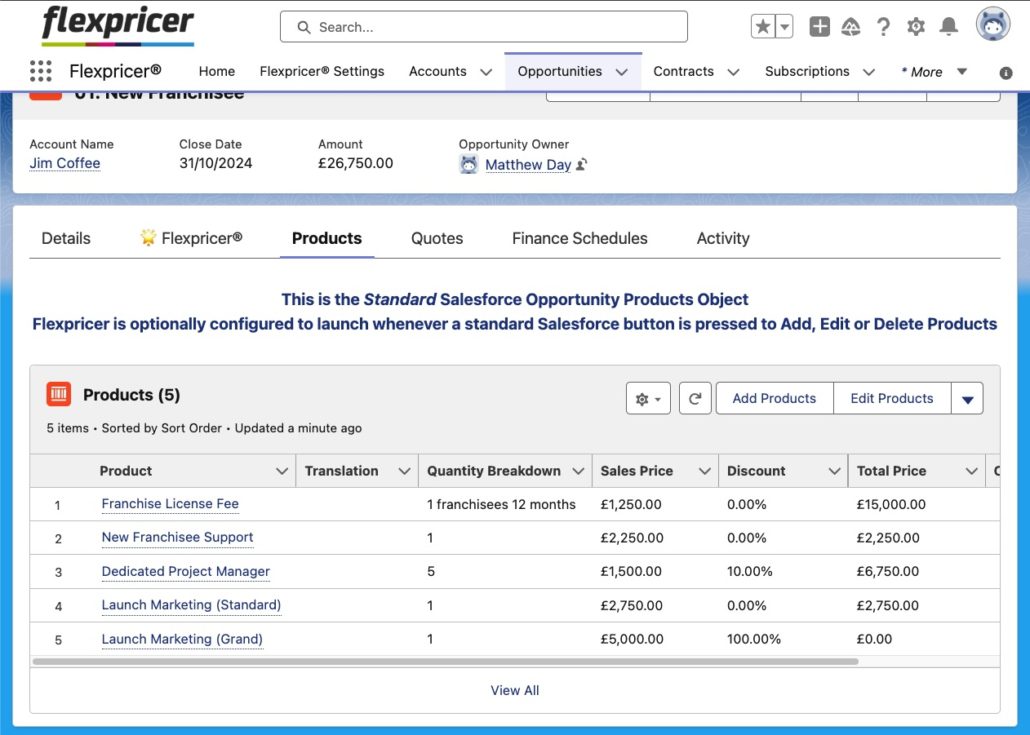
In Sales Cloud, you select a Product using a basic interface to add it to a Quote or Opportunity.

There is no way to easily designate a product as being additional to the quote or an alternate to an existing line item because Sales Cloud does not include a Optional Line Item functionality.

Flexpricer extends Sales Cloud capability with a Optional Line Items for Opportunities and Quotes.

Sales Users simply click a simple icon on any line item to designate it as optional.  A field on the line item is updated to record the fact that the line item is optional and the existence of this field’s data can be used to change behavior of the line item when presenting on quotes.

No form to fill in or email address required.
Screenshot of Sample Email Template showing Optional Line Items in Salesforce

Create Accurate Quotes in Salesforce

Without a specialist tool, creating quotes with optional line items is difficult, with a high risk of pricing errors should the values of the optional line items not be properly controlled.

Flexpricer’s Optional Line Items offers

  • A simple user interface for sales users to designate line items on Quotes or Opportunities as optional
  • Optional Line Items saved as standard Quote Line Item and Opportunity Product records with zero value contributing towards pipeline/forecast
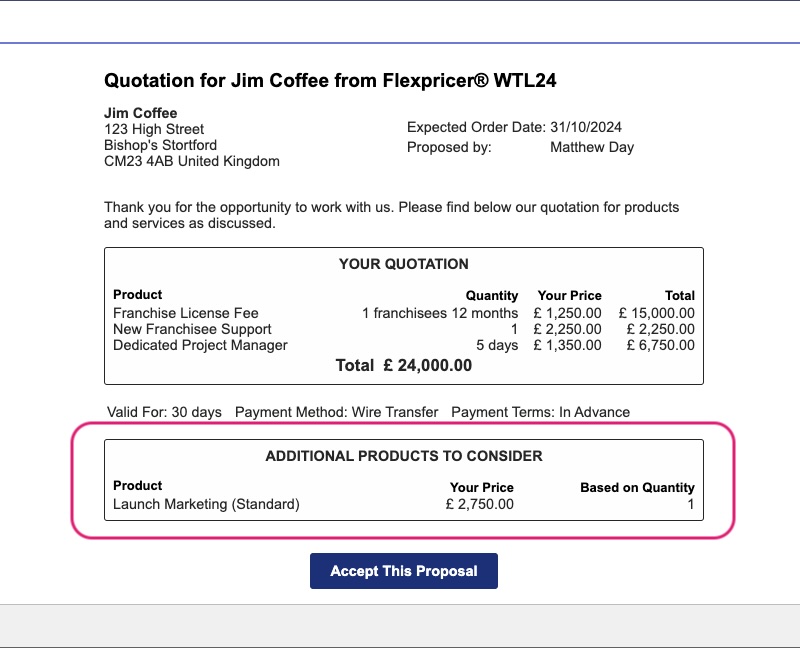
  • Additional information stored on the records can be used to manipulate the presentation of Optional Line Items on quote emails, PDFs or other output channel

Optional Line Items as Alternates

Using the standard product selector in Sales Cloud, users struggle to add line items to an opportunity or quote for products that can be swapped out with others.

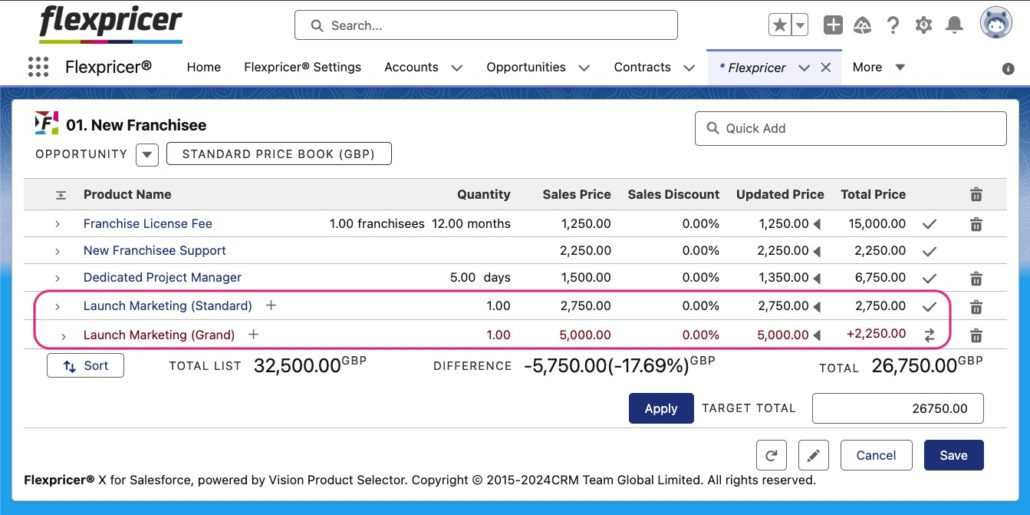
Using Flexpricer, selecting line items as alternates for upsell or replacements is a simple drag-and-drop operation…

  • Add the line item to the opportunity or quote
  • Designate the line item as optional
  • Drag the line item on top of the one that’s the alternate

A ‘swap’ icon designates the line item as an alternate and its price, including difference, is clearly presented.

Screenshot of Alternate Line Item as an Optional Line Item in Salesforce
Screenshot of Optional Line Items in Opportunity Product Related List

Standard Sales Cloud Objects

Flexpricer utilizes standard Sales Cloud objects.  Your Optional Line Items are not locked away in custom objects that require an additional license.

Using standard Salesforce reports and dashboards, you can track your Optional Line Items to check which opportunities / quotes they have been presented on.

By offering Optional Line Items, does your win rate and average order value on Opportunities improve?  You can monitor this, and more, because Optional Line Items co-exist with necessary line items in the same object.

Optional Line Items is commonly used by companies presenting alternate or additional line items on a Quote in Salesforce without their values contributing to the total amount.

Salesforce Optional Line Items – what are they?

Optional Line Items are standard Salesforce Opportunity Products or Quote Line Items whose values do not contribution to the total amount on the Opportunity or Quote.

The functionality available using Sales Cloud objects with Flexpricer’s user interface to designate existing line items as additional or alternate with a simple drag-and-drop operation.

Do Optional Line Items support multi-currency?

Yes! Flexpricer fully supports Salesforce multi-currency capability and honors all standard Sales Cloud behavior related to products, pricebooks and pricebookentries.  Irrespective of the currency that you quote in, Flexpricer and Optional Line Items works seamlessly to expand your Sales Cloud capability.

How else can Optional Line Items benefit my business?

A significant benefit of using Optional Line Items is have a list of available line items on a Quote so that sales user (and customer) can easily see not just those line items that are included on the Quote, but additional ones too.

Using 3rd-party docgen tools, powerful presentations and proposals can be generated to upsell line items (using ‘alternate’ optional line items) and cross-sell (using ‘additional’ optional line items).

Learn More About Optional Line Items and Book a Call Today

Find out more about Flexpricer and Optional Line Items in Salesforce: talk through your use case with an expert in a FREE discovery call.